

Spotify is a place to explore excellent music, but it only lets Premium subscribers download songs that are in DRM-protected OGG format. That’s why people are looking for ways to convert Spotify to MP3 for flexible usage. So, how to convert Spotify to MP3 exactly?
There are 7 workable ways in this post, free and online methods included. Among all, using MuConvert Spotify Music Converter is the best way to convert Spotify music/playlists to MP3 in original quality. Better yet, you can do this without Spotify Premium. You can download it and have a free trial.

How to Convert Spotify to MP3 with MuConvert Spotify Music Converter
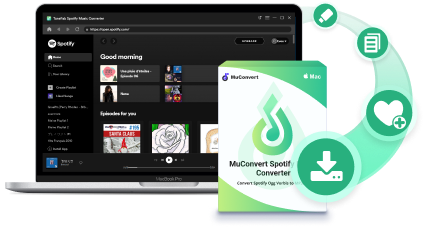
MuConvert Spotify Music Converter is taking the lead in music conversion technology. It makes it easy for you to convert Spotify tracks, playlists, albums, and podcasts to DRM-free formats like MP3, M4A, FLAC, WAV, AIFF, AAC, and ALAC. Also, the software can keep the best quality of up to 320kbps. Then, you can enjoy high-res Spotify music on any device without restriction. Better yet, it requires no Premium subscription to remove DRM protection from Spotify.
- 35X faster speed: offer 35X faster converting speed to convert Spotify music to MP3 within seconds.
- Retain lossless quality: convert Spotify songs and playlists to lossless audio files to ensure the same high-quality offline streaming.
- Batch conversion: process multiple song conversions at once to save much time.
- Several useful formats: easily remove DRM protection from Spotify and convert Spotify to MP3 and other popular formats that you can transfer, share, and play Spotify tracks anywhere.
- User-friendly experience: provide an easy UI to facilitate converting Spotify songs to audio files with ease.
- Keep metadata: save the music metadata and ID3 tags of Spotify songs to facilitate convenient offline song management.
- Personal settings customization: allow you to tweak output location, preset output tracks archive, and file name before downloading.
Now, download and install MuConvert Spotify Music Converter. Let’s walk through how to convert Spotify to MP3 and listen to Spotify music offline without Premium in a few steps.
 100% Secure 100% Secure
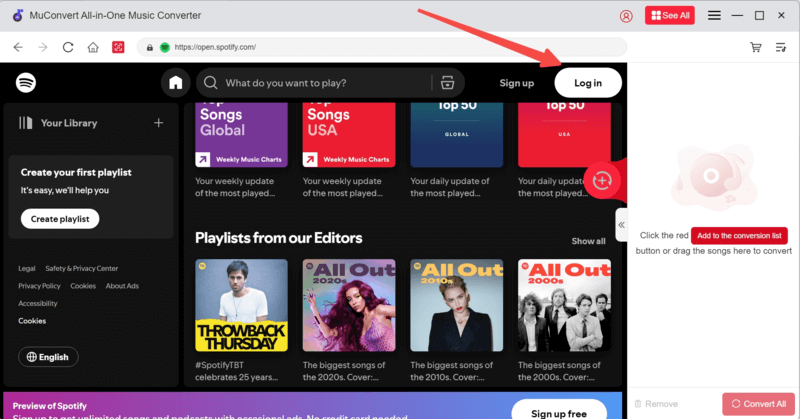
Step 1. Log into Spotify Web Player
After launching MuConvert Spotify Music Converter and entering the Spotify service, please log into your Spotify account by clicking on the Login button in the top right corner.
Step 2. Analyze Spotify Playlist
Now, open a Spotify playlist or album you are about to convert Spotify to MP3. Subsequently, click on the Plus icon, and MuConvert will initiate the Spotify playlist analysis process right away.
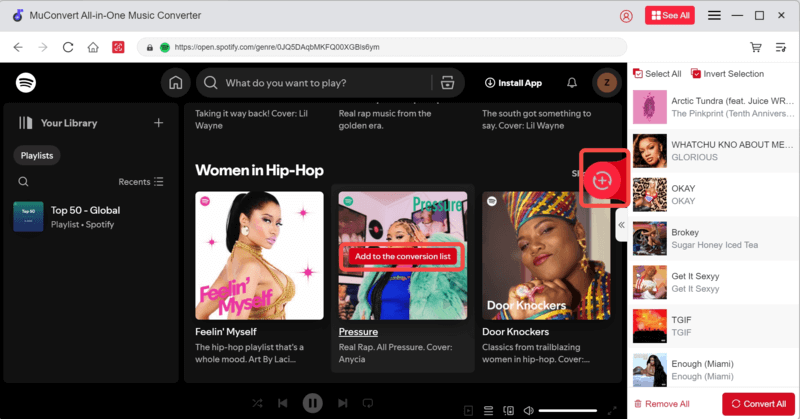
Step 3. Select MP3 as Output Format
Expand the conversion list, here you can adjust the output format, bitrate and sample rate. Then hit “Convert All”.
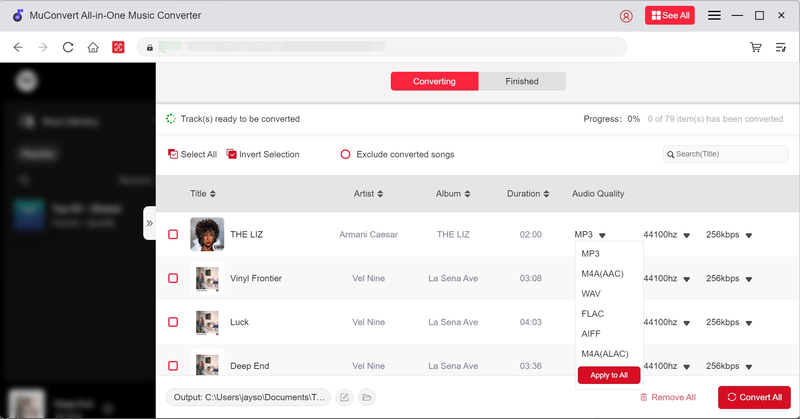
Step 4. Check Downloaded Content After Finishing
When the songs you selected are finished converting, you can turn to the Finished tag to check them. Move your mouse to the left of the songs, and you can directly play them in the program. Then, click the file icon to check your work.
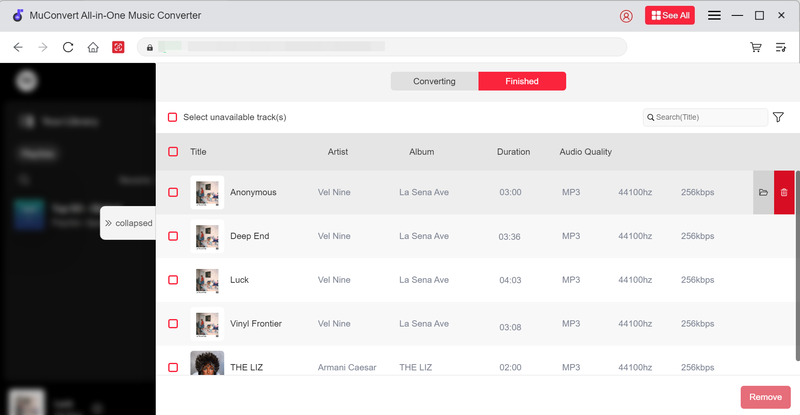
Easy, right? MuConvert Spotify Music Converter is a program that can meet all the qualifications for pleasant music conversion. Also equipped with a responsive support team, MuConvert Spotify Music Converter ensures the best service to convert Spotify songs. So, when you run into any troubles while converting Spotify songs with MuConvert, you can reach the support team to help you out.
100% Secure 100% SecureHow to Convert Spotify Songs to MP3 for Free with AllToMP3
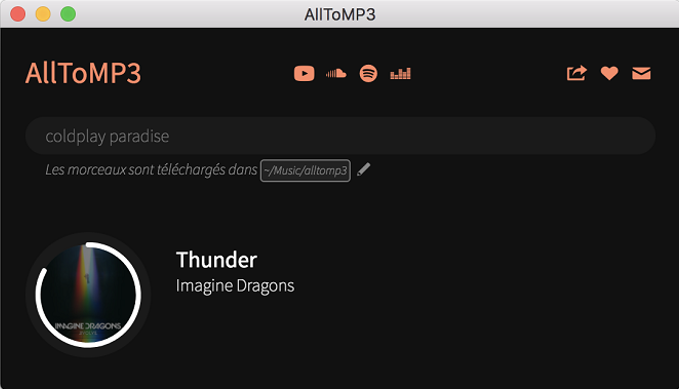
AllToMP3 is open-source software that enables users to download Spotify free of charge. This Spotify to MP3 converter is a desktop application available for Windows, Mac, and Linux. Moreover, it can keep ID3 tags, album art, and even lyrics.
However, AllToMP3 provides an unstable real-time conversion that could make your computer hang up and the software sometimes crashes before downloading. Below are the steps to convert the Spotify link to MP3 with AllToMP3:
- Download and install AllToMP3 Spotify to MP3 converter to your device.
- Open the Spotify Web Player or Spotify desktop or mobile app, and browse the music or playlists that you want to convert to MP3.
- Copy the URL of the music and paste it into the AllToMP3 Spotify MP3 converter. Then press Enter, and it will start to convert Spotify to MP3.
How to Convert Music from Spotify to MP3 via SpotifyMate
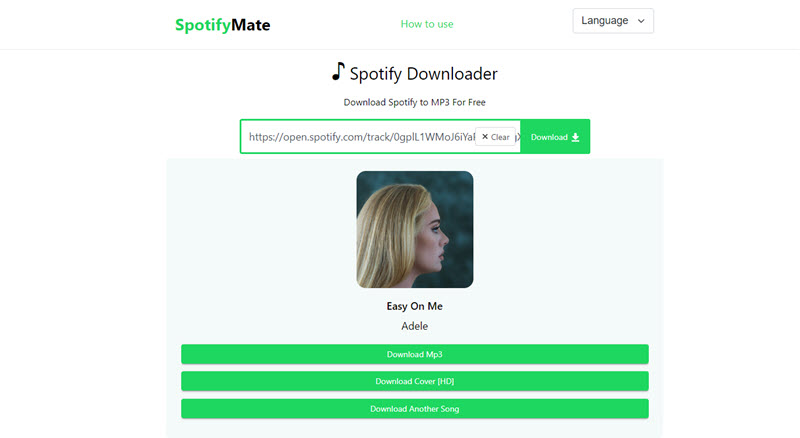
SpotifyMate provides an online free conversion service that enables you to convert Spotify to MP3 online or download the cover of an album. You can literally use it with any browser like Chrome, Firefox, Edge, Opera, and Safari on any device. Also, this free online Spotify to MP3 converter allows PWA (Progress Web App) features that let you create a shortcut on the desktop on the main screen for quick access.
However, the output quality is around 196kbps. That seems not as good as expected. Also, you should be aware that this online Spotify to MP3 converter cannot convert multiple songs at once nor download the entire album/playlist. If you still want to give it a shot, let’s find out how it works below.
- Visit SpotifyMate on your browser.
- Then, open another tab and go to Spotify web player.
- Copy the URL of your desired song and paste it into the bar in SpotifyMate. Then, click Download and it will convert Spotify music to MP3.
- When done conversion, click Download MP3 to save your favorite Spotify songs.
How to Convert Spotify Music to MP3 Using an Audio Recorder
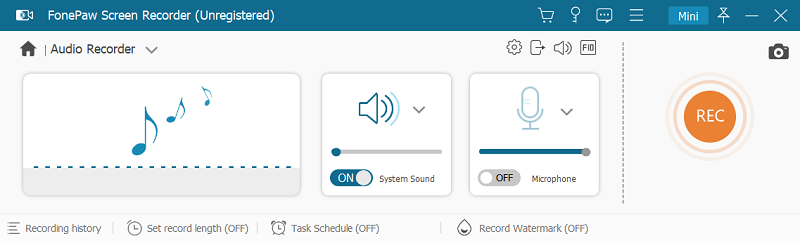
Another reliable way to convert Spotify to MP3 songs is to record the songs and save the audio recordings in MP3 format. For this purpose, you can try the industry-leading program, FonePaw Screen Recorder.
Overview Features of FonePaw Screen Recorder:
- High-quality recording outputs
- Various output formats to save audio recordings
- Effortless recording process
- Soundcheck feature
- Scheduled recording setting
Now, let’s see how to use FonePaw Screen Recorder to record Spotify to MP3.
- Open FonePaw Screen Recorder and go to Audio Recorder on the main feed.
- Check the volume of your system sound. It is recommended to turn off the microphone to avoid unnecessary noise.
- Go to Settings >> Output to select MP3 as the output format.
- Play the Spotify songs and initiate the recording meanwhile.
- End the recording when the Spotify song stops playing.
- Save the Spotify song recording.
How to Convert Spotify to MP3 via Open Source spotDL
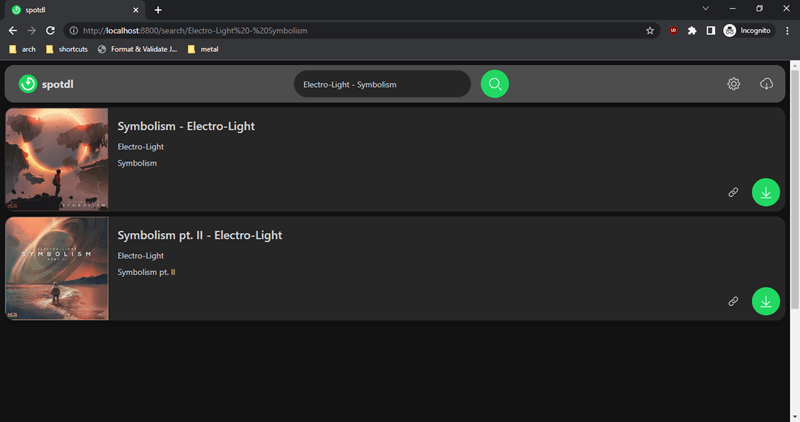
If you have basic knowledge of Python, then you may be curious about this command-line Spotify downloader – spotDL. This open-source downloader enables you to download Spotify playlists and songs on command and convert Spotify music to MP3 on your Windows, Mac, or Linux.
Since spotDL is set to fetch the default audio quality of Spotify songs, the output music quality is capped at 128kbps at best. Also, you may need to take quite a while to run spotDL in your command prompt first. If you like doing Spotify conversion on your own, let’s proceed to a further idea below.
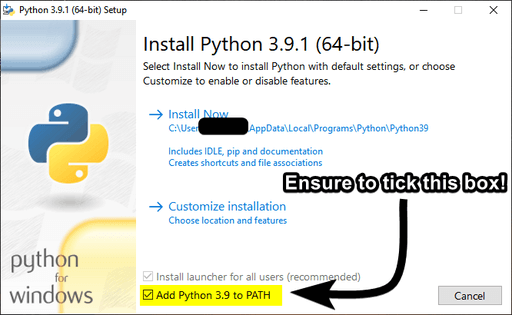
- First off, download and install Visual C++ 2019 redistributable (Windows Only), Python 3.7 or above, and FFmpeg 4.2 or above on your computer. Don’t forget to select Add to PATH during installation.
- Next, download spotDL files from GitHub and run Command Prompt on Windows, Terminal on Mac, and Bash/Zsh on UNIX.
- Then type in pip install spotdl to install spotDL on Windows or pip install spotdl command on macOS/UNIX.
- Install FFmpeg to the local directory of spotDL by typing spotdl –download-ffmpeg in the command line.
- Use this command ./spotdl-vX.X.X operation [urls] to convert Spotify music to MP3.
How to Convert Songs from Spotify to MP3 via Shortcut (For iOS)
If you want to convert Spotify to MP3 on your iOS, you can try to use a Shortcut, called Spotify To MP3, to help. Spotify to MP3 Shortcut is an automatic program for iOS running under 15. It allows you to automate workflows to download music from Spotify as MP3 files. This program is totally free to use. But remember that it can only help you download 30 songs. Now, follow the steps to learn how it works.
- Navigate to this Spotify shortcut website, and click “Get Shortcut” to add it to your phone.
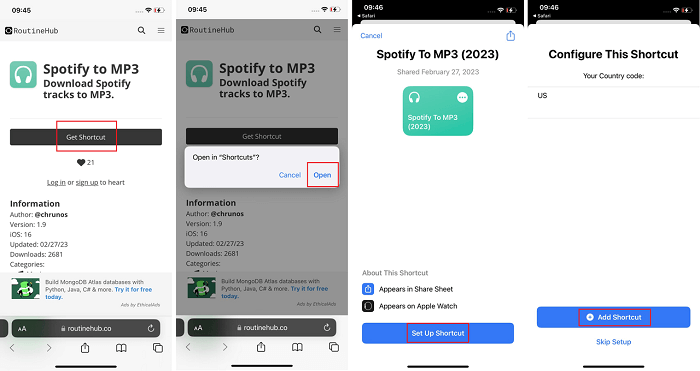
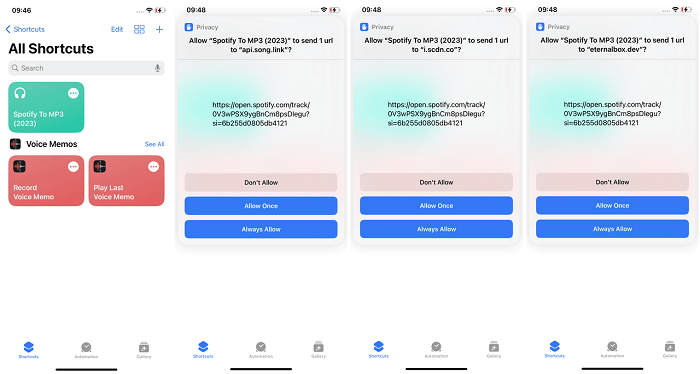
- Go to the Spotify app to copy the link of the song that you want to convert.
- Back to the Shortcut to choose “Spotify To MP3” to enter the URL of the Spotify track or playlist that you want to convert, then it will begin to parse the song and download it as an MP3 file. You can then access the MP3 file in the Files app or any other music player app.
How to Convert Spotify to MP3 with Telegram Bot (For Android)
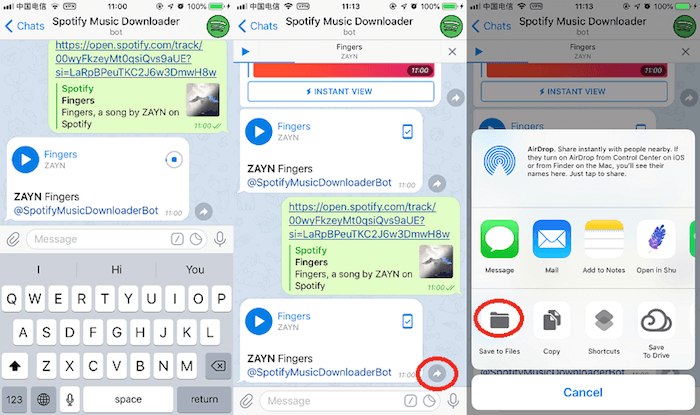
A Telegram Spotify Downloader Bot is a bot that allows you to download Spotify songs, albums, and playlists to MP3 on your Android or iOS devices. There are a number of different Telegram Spotify Downloader Bots available, like @SpotifySaveBot, @spotifydl_mp3_bot, etc. Once you install the bot on your Telegram, you just need to use some simple commands to get your Spotify songs downloaded as MP3.
To use a Telegram Spotify Downloader Bot, simply follow these steps:
- Open Telegram and search for the bot that you want to use, then add the bot to your Telegram.
- Send the bot the URL of the Spotify content that you want to download.
- Then the bot will download the content for you and send it back to you in MP3 format.
7 Best Ways to Convert Spotify to MP3: An Overview
| Convert Spotify to MP3 via | MuConvert Spotify Music Converter | AllToMP3 | SpotifyMate | FonePaw Screen Recorder | spotDL | Shortcut | Telegram Bot |
|---|---|---|---|---|---|---|---|
| Price | Free for 30 days | Free | Free | Registered version starts at $19.56/Month | Free | Free | Free |
| Compatible OS | Mac, Windows | Windows, Mac, Linux | web-based | Mac, Windows | Windows, Mac, Linux | iOS | iOS, Android |
| Supported Output Format | MP3, M4A, FLAC, WAV, AIFF, AAC, and ALAC | Only MP3 | Only MP3 | WAV, AIFF, Ogg Vorbis, FLAC and MP2 | Only MP3 | Only MP3 | Only MP3 |
| Conversion Speed | Fastest (35X) | Medium | Medium | Medium | Medium | Medium | Medium |
| Customize Output Quality | Lossless | Low | Low | High | Low | Low | Low |
| ID3 Tags Preservation | YES | YES | YES | NO | NO | YES | YES |
| Supported Spotify Contents | Songs, Playlists, Albums, Podcasts, etc. | Tracks, Albums, Playlists, etc. | Only single songs | Only single songs | Tracks, Albums, Playlists, etc. | Only single songs | Only single songs |
Still hesitant to make a choice? Here are some tips to convert Spotify to MP3 for different purposes:
- Listen to a large collection of Spotify MP3 with lossless quality: MuConvert Spotify Music Converter performs well at sound quality up to 320kbps, and supports batch download to save your waiting time.
- Convert Spotify to MP3 without charge: SpotifyMate or spotDL converts Spotify to MP3 free and even online without downloading any software.
- Convert songs on any platform to MP3: FonePaw Screen Recorder breaks the platform limit and records all songs you like to MP3 for offline listening.
- Enjoy Spotify MP3 on mobile devices: Shortcut or Telegram bot both convert Spotify to MP3 on mobile phone for free.
FAQs About Converting Spotify Songs/Playlists to MP3
Having unsolved questions in mind? There are a few frequently asked questions about converting Spotify music to MP3. You may want to check out the following answers to get your questions solved.
Q1: Can you export downloaded Spotify music from Spotify app as MP3 directly?
Spotify provides free and Premium plans. Free accounts may only stream songs in AAC 160kbps while Spotify Premium subscribers can stream and download tracks in AAC 320kbps. However, the downloads are DRM-protected in OGG files rather than MP3 files, which are subject to restrictions that you can only play the downloaded music in the app. Therefore, you cannot directly download Spotify songs to MP3 files, but the 5 methods above are able to convert Spotify to MP3 for you.
Q2: Why do people choose to download Spotify songs rather than stream them?
There are a few aspects to consider including storage, data usage, audio quality, and accessibility. Though it takes much storage to download Spotify songs for offline listening, you can instead save a lot of data usage especially when you’re outdoors. Also, despite that streaming and offline listening can both get 320kbps lossy AAC audio, higher audio quality consumes more data usage. As for accessibility, you’ll have a terrible streaming experience without or with a dodgy internet connection. As long as storage is not a concern, it must be a better choice to download Spotify songs for offline playback.
Q3: How to customize Spotify with higher quality?
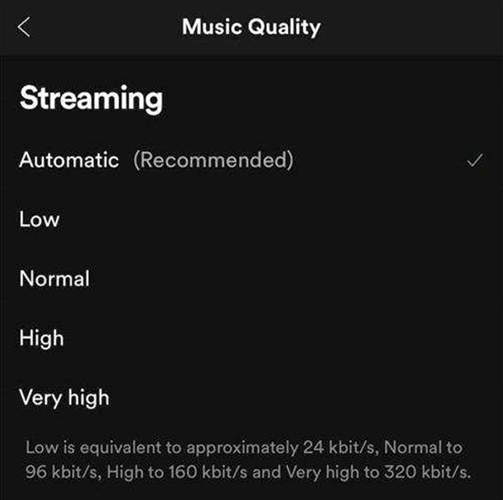
While streaming Spotify music on the web, free users can listen to audio quality of up to 128kbps while Premium users can enjoy up to 256kbps AAC audio. When it comes to the desktop or mobile app, free users are only able to stream Spotify music at up to 160kbps, and Premium users have more audio quality tiers to choose from Automatic to Very high (Approximately 320kbps). You can go to Settings > Audio Quality on Spotify to customize the audio quality for your liking.
Q4: Is it illegal to convert Spotify to MP3?
That depends. If you convert Spotify music to MP3 for personal use, education, or charity, that’s totally okay and you don’t have to worry about that. But, if you try to sell or make a profit from Spotify music, you’ll get into trouble sooner or later.
Convert Spotify Music to MP3 in 320kbps
Drag and drop to convert Spotify songs, albums, playlists, and podcasts to MP3 easily.
More Posts
14 Best Spotify to MP3 Converters in 2025 [Free Picks] Read More » Convert Spotify to MP3: 7 Best Ways Recommended in 2025 Read More » How to Download Spotify Songs for Free [2025] Read More »