


Like other music streaming services, YouTube Music also regulates its offline streaming feature by adding DRM encryption to its music resources. Hence, directly downloading MP3 files from the YouTube Music streaming app or its online web player becomes impossible – even if you subscribe to YouTube Music premium, the downloaded YouTube Music songs can’t be converted or exported as MP3 files.
Instead of looking for official solutions, there are still workable third-party tools that can help download YouTube Music to MP3 successfully (with original sound quality preserved but without copyright protection). Now, let’s move on and explore how.

Way 1: Download YouTube Music to MP3 via MuConvert
To convert and download YouTube Music to MP3, the most reliable and efficient way is to use a professional YouTube Music converter. Here, MuConvert YouTube Music Converter is always the top choice.
By embedding the official YouTube Music web player inside the software, MuConvert YouTube Music Converter allows you to directly extract streaming music from YouTube Music to MP3 files or other mainstream audio formats, with original 320kbps audio quality preserved. It lets you log into your YouTube Music account and select any album, playlist, or even your whole music library to download at once efficiently.
As MuConvert YouTube Music Converter has been equipped with the built-in hardware acceleration technologies, you will enjoy 35X or even faster batch downloading performance to download YouTube playlists to MP3s in a quite time-saving way!
- Supports the conversion of YouTube Music, playlists, and videos to MP3 format.
- Ensures downloads output with original sound quality.
- Batch conversion of playlists and songs at once.
- Download YouTube Music at speeds up to 35X faster.
- Offer user-friendly interface, perfect for beginners.
Below are the guidelines of how to download YouTube Music to MP3 with MuConvert, both suitable for Windows and Mac systems.
 100% Secure 100% Secure
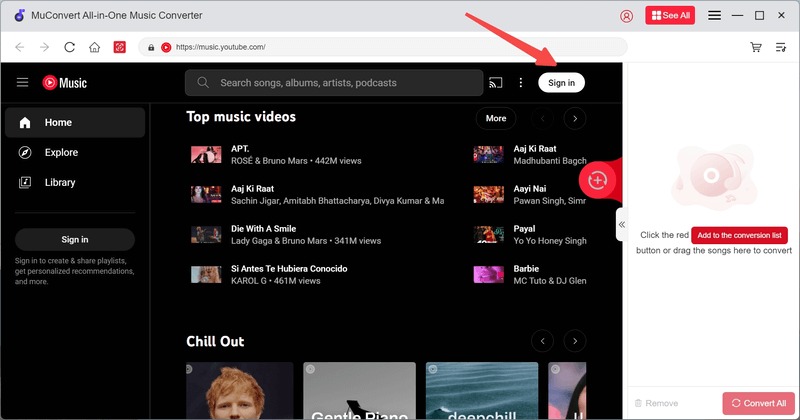
Step 1. Install MuConvert YouTube Music Converter and launch the software on your desktop. After entering the main interface of the converter, tap the “Sign in” button to log in to the built-in YouTube Music web player via your account.
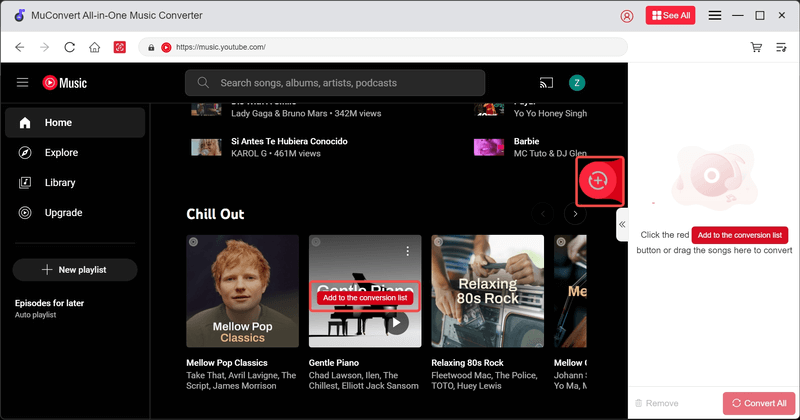
Step 2. After completing the account login, you can browse your favorite songs, albums, and playlists in the web player as usual. By adding them to the downloading list, simply drag and drop to the “Add” button or the conversion panel on the right side.
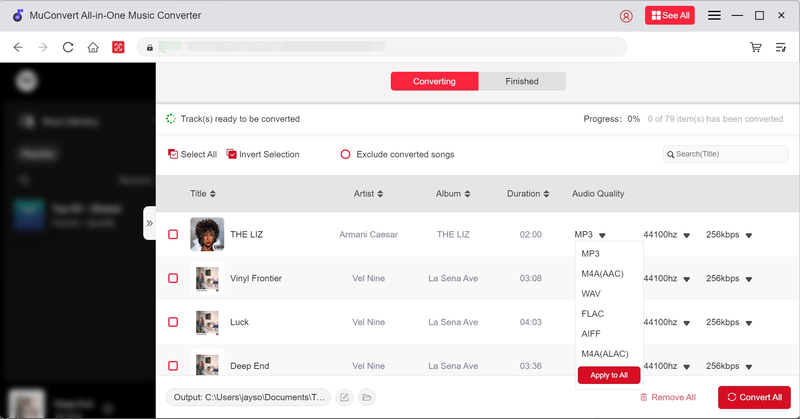
Step 3. When the YouTube Music songs you want to download have been added to the conversion queue, navigate to the converting window and customize audio parameters before downloading them. Choose MP3 as the output format and also adjust the quality settings (such as bitrate and sample rate) in your preferences.
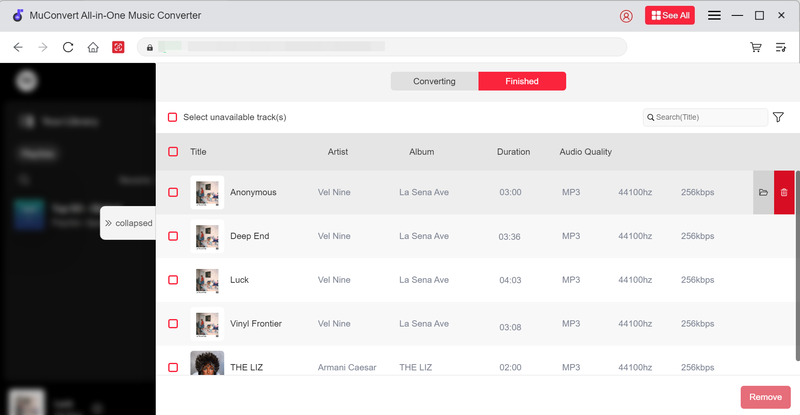
Step 4. Finally, simply tap the “Convert All” button to start downloading YouTube Music to MP3 right away.
Way 2: Download YouTube Music Video to MP3 with Free Online Tool
If you want to download YouTube music videos to MP3s without installing any software or on mobile devices, you can try some free online downloaders. Although many YouTube downloaders are not actually working to help (or with messy ads disturbing your downloading experience), Y2Mate is still the one that can help you download YouTube Music to MP3 quickly and conveniently. You can directly search keywords on it or paste YouTube video URLs to process the MP3 download instantly.
However, this tool doesn’t support batch conversion. For a smoother downloading experience, try MuConvert, which lets you download entire playlists and albums with just one click.
Below are the steps for you to get YouTube MP3 downloads through Y2Mate.
Step 1. Go directly to Y2Mate and use the search function to search for the YouTube music video you’d like to download.
NOTE: Copying and pasting the URL to access the exact video for downloading as MP3 is also possible.
Step 2. When the video results come out, tap “Download” and Y2Mate will convert the YouTube music video for you.
Step 3. Once the conversion is done, select MP3 and the quality you like, then tap the download icon to save the YouTube music video as MP3 offline.

Way 3: Get MP3 Files from YouTube Music with Recorder
Recording is also another way to get MP3 files from YouTube Music, even more flexibly! Even for extracting audio clips from a long YouTube video or downloading podcast episodes as MP3s freely from YouTube, using an audio recorder lets you control the duration pretty conveniently.
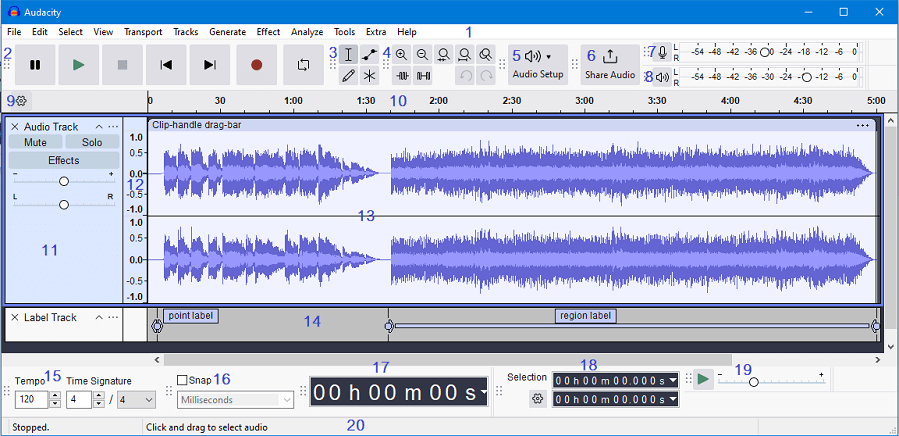
To record YouTube Music for saving songs as MP3 files with a recorder, Audacity can no doubt be a good option you should not miss. More than being a simple audio recorder, Audacity also offers handy editing toolkit to let you personalize the recorded MP3 files instantly before exporting. In addition, it supports various output formats like MP3, WAV and FLAC, which can make it easier to manage your recordings.
While Audacity is a free and versatile tool, the process can be time-consuming since it only supports recording one song at a time. If you’re looking for a faster, more efficient solution with high-quality results, we recommend using MuConvert YouTube Music Converter to simplify the process.
Below are the steps for you to record YouTube Music through Audacity.
Step 1. Download and install Audacity from its official website.
Step 2. Enter Audacity and configure the recording source to capture system audio without picking up any microphone sounds.
Step 3. Hit the big red circle recording button in Audacity and play the YouTube Music song you want to reocrd to MP3.
Step 4. After finishing recording, you can edit and cut the silence of the track, then export it as an MP3 file using “File>Export>Export as MP3.”
Way 4: Download Music from YouTube to MP3 by Browser Extension
Downloading YouTube Music to MP3 by using a browser extension is another quick and easy way. By adding such an extension to your browser, the download service will be activated automatically to extract YouTube videos or audio, letting you download as MP3 files offline directly.
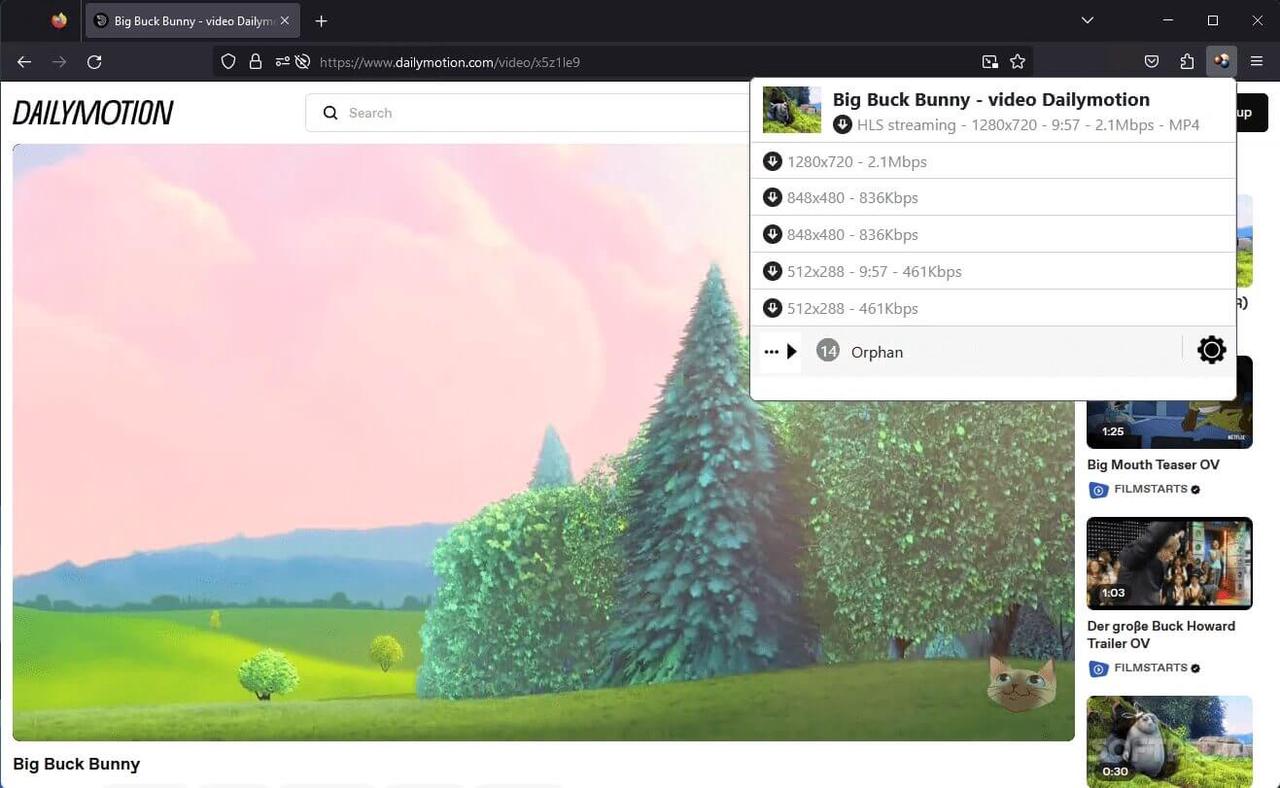
Video DownloadHelper is such a helpful extension, which works on Firefox and Edge seamlessly to help you download YouTube Music as MP3 files with only one shot. In the following, also grasp the guide and download YouTube Music to MP3 with the Video DownloadHelper right away:
Step 1. Install Video DownloadHelper from the Firefox or Edge extension store.
Step 2. Enter YouTube and play the music video or playlists you want to download.
Step 3. Tap the Video DownloadHelper icon in the browser toolbar and then select the video you want.
Step 4. Choose the MP3 format and start to download. All the audio files will be saved to your local drive.
Way 5: Download YouTube Music to MP3s in YouTube Audio Library
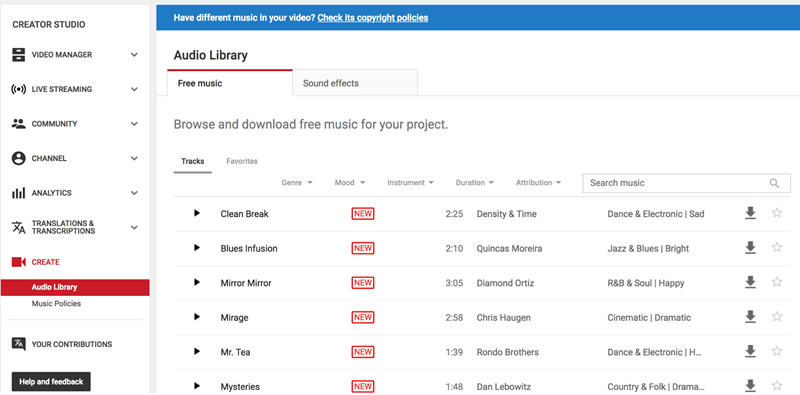
Actually, directly downloading MP3 from YouTube Music official is still possible, as YouTube has launched the YouTube Audio Library with royalty-free MP3 resources available to download offline. Here’s how to get MP3s from YouTube Audio Library for free:
Step 1. On YouTube, go to your YouTube Studio and navigate to “Audio Library” on the left panel.
Step 2. In the library, browse or search for the tracks you like.
Step 3. Directly tap the provided download icon, and then the track will be downloaded as an MP3 file offline right away!
FAQs about Downloading YouTube Music to MP3
Q1 Is There A Current YouTube to MP3 Conversion Tool?
Yes, there are still many online YouTube to MP3 converters that appear in the search results that can deliver help. However, such online converters may break down from time to time. Some of them can only phrase YouTube URLs and provide video information, but actually not working to download YouTube videos or audio at all. Worse yet, most of them are filled with messy ads and may redirect you to third-party websites (probably force you to download malware or bundled adware). By comparison, if you need a YouTube to MP3 conversion tool, a desktop program like MuConvert YouTube Music Converter is more reliable.
Q2 Is It Legal to Convert YouTube Music to MP3?
Downloading YouTube Music to MP3 for personal use is generally allowed. However, distributing the downloads violates copyright laws and YouTube’s terms of service. Hence, please ensure that you use the downloads only for personal use, not for commercial or business purposes.
Q3 Is There A Safe Way to Convert YouTube to MP3?
As mentioned, most online free YouTube to MP3 converters are full of pop-up ads, which can easily lead to security issues like redirecting you to phishing websites, resulting in privacy disclosure or other problems. By comparison, desktop software provides an ad-free environment, and like MuConvert YouTube Music Converter, which will be equipped with a security system to strictly protect user privacy.
Conclusion
To download YouTube Music to MP3, there are several handy ways that can deliver you efficient help – even when the official has not launched such a service yet.
Among all these solutions, MuConvert YouTube Music Converter stands out as the most reliable and efficient option among the several ways to download YouTube Music to MP3. It offers a seamless and hassle-free exprience with the ability to deal with entire playlists and videos, deliver high-quality audio and support both Windows and Mac system. So don’t wait, download MuConvert for free today and enjoy your YouTube Music offline journey with ease.
100% Secure 100% SecureEnjoy YouTube Music in Crystal-Clear MP3 Format
Install MuConvert for free to download YouTube Music in lossless quality and universal formats. Enjoy up to 35X faster conversion!

More Posts
6 Best YouTube Music Downloader Apps for Computer Read More » How to Download Music from YouTube Music (for ALL Users) Read More » Top 8 Free Online YouTube Music Downloaders (Safe & Easy) Read More » 8 Best Music Downloaders or MP3 Download Sites for Computer Read More » How to Download MP3 Songs for Seamless Playback on Any Device Read More »