

Compared with MP3 audio format, WAV files preserve the original sound quality with lossless audio, making them perfect for mixing, editing, or professional playback. However, SoundCloud, one of the most popular streaming platforms, does not provide a built-in option to download tracks in WAV. Even if you have discovered a piece of niche music released by an independent musician, you can’t directly download SoundCloud in WAV audio format at all.
Fortunately, to download or convert SoundCloud to WAV, there are still handy ways you can try. In this blog, the 5 best solutions are collected to help you process the conversion without hassle. Now, grasp the guide and save your favorite SoundCloud tracks in WAV format offline losslessly!

Why Download SoundCloud to WAV?
Before diving into the tools and the operations to use them to convert SoundCloud to WAV, you can have a quick start to look at the benefits of saving SoundCloud music in WAV format:
- Lossless Quality: WAV files store uncompressed audio, ensuring the best sound quality for professional use, like project creation.
- Editing Compatibility: Most audio editing software (Audacity, Adobe Audition, FL Studio, etc.) supports WAV format better than other compressed formats.
- Better Playback: DJs, musicians, and producers often rely on WAV because of its accurate sound reproduction to deliver better streaming experience.
If you are also one of them who needs SoundCloud tracks for these purposes, don’t hesitate and move down to download SoundCloud to WAV right away!
5 Best SoundCloud to WAV Downloaders
Actually, to convert SoundCloud to WAV, there are different ways to achieve the goal. You can directly download SoundCloud tracks in WAV format, or record them to save the independent audio files. In the following, let’s go through the 5 most effective ways that are 100% working to help.
Top 1. MuConvert SoundCloud Music Converter (Best Overall)
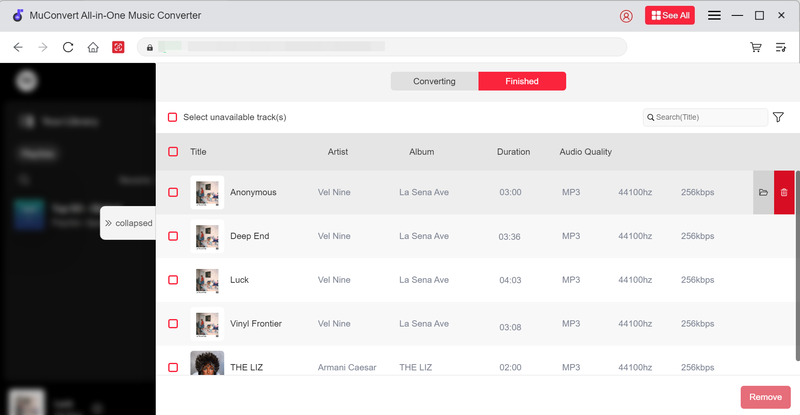
If you are looking for a way to directly download complete SoundCloud tracks without quality loss in WAV format, then MuConvert SoundCloud Music Converter should be the priority to consider. This professional music downloader directly embeds SoundCloud inside the software, allowing you to select any streaming music resource released on the platform and download them at high efficiency.
MuConvert SoundCloud Music Converter has applied an advanced decoding system to process music download, maintaining uncompressed audio quality (at original 320kbps) to preserve SoundCloud downloads in WAV, MP3, M4A, and other mainstream formats.
 100% Secure 100% Secure
In addition, MuConvert SoundCloud Music Converter also uses multiple hardware acceleration technologies to guarantee high conversion efficiency. It can speed up the batch downloading performance to at least 35X faster, helping you save SoundCloud playlists simultaneously without wasting time. For those who get batches of SoundCloud songs to download in WAV format at once, MuConvert SoundCloud Music Converter can surely be the best SoundCloud playlist downloader you should try.
- Built-in SoundCloud web player to directly browse, search, stream, and download songs or playlists;
- Mainstream formats like WAV, MP3, M4A, etc. to output SoundCloud downloads without quality loss (up to 320kbps at max);
- Full ID3 info preservation and auto-archiving ability to output SoundCloud downloads in order;
- Batch resolve SoundCloud playlist download at 35X or even much faster speed;
- 100% secure in-app environment to ensure music download at high efficiency and the best success rate.
In the following, also grasp the brief guide and try using MuConvert SoundCloud Music Converter to download SoundCloud to WAV with ease:
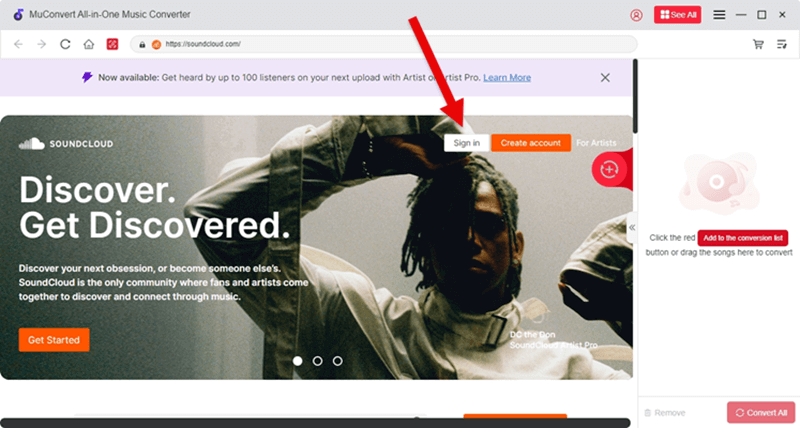
STEP 1. Install MuConvert SoundCloud Music Converter on desktop and launch the software. On the main interface, select SoundCloud and complete the account login to access its full music library.
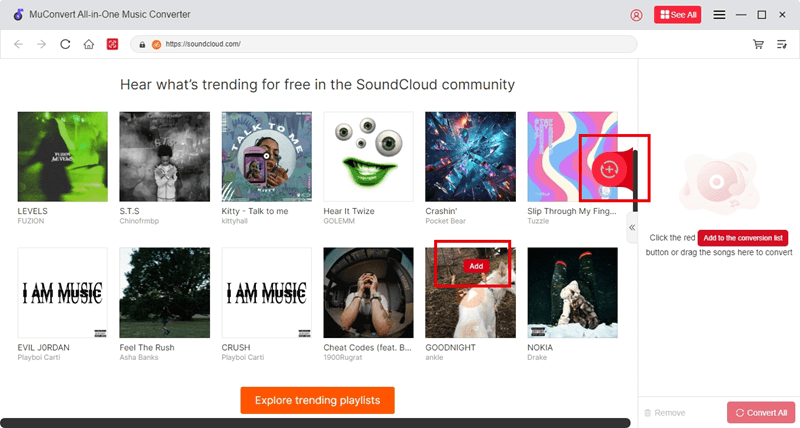
STEP 2. Now, choose any song or playlist to download. Directly drag and drop them to the conversion panel to add to the downloading list.
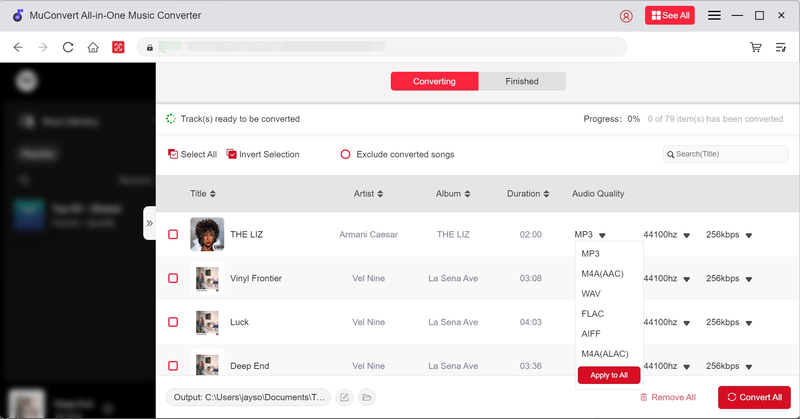
STEP 3. Before processing the music conversion, go to the “Converting” window and you can choose WAV as the output format. In addition, you can freely customize the output quality like the bitrate and sample rate as you desire.
Tips: Best SoundCloud to MP3 Converter Tools in 2025 [Top 8 Picks]
STEP 4. Finally, simply tap the “Convert All” icon, and MuConvert SoundCloud Music Converter will process the SoundCloud playlist download in batches. Wait for a short moment, and then you will get all of them converted as WAV local files offline.
Top 2. Soundcloudrips
If you prefer a fast solution without installing software, online SoundCloud to WAV converters are ideal options to let you process a quick conversion to get SoundCloud tracks saved in WAV format. Popular web-based tools like SoundCloudRips, KlickAud, and OKmusi can all bring reliable help.
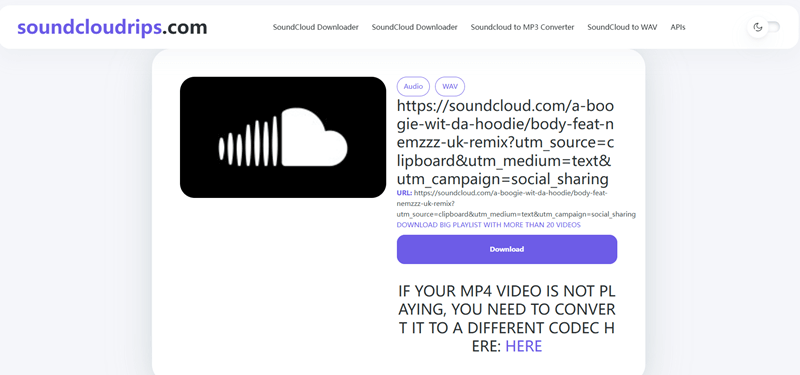
In most cases, these online converters are free to use, though some of them will contain ads that can disturb your conversion process a bit. But as they are easy to use, it can be time-saving for those who only need to download a couple of SoundCloud songs in WAV format. Next, let’s see how such online tools work step by step (here, we will take SoundCloudRips as an example):
These online downloaders may not always guarantee high-quality WAV files. Some only re-encode MP3 into WAV, which does not provide output files in the same quality as original SoundCloud tracks. To download SoundCloud to WAV without quality loss, you still need help from professional downloader like MuConvert SoundCloud Music Converter.
STEP 1. To get started, go to SoundCloud and find the music you want to download and save offline in WAV format. Copy its music link.
STEP 2. Go to SoundCloudRips in a new tab. Paste the link to the frame bar, and then choose “WAV” format from the drop-down format menu and tap the “Download” icon to convert the link.
STEP 3. Once the conversion completes, scroll down and tap the “Download” icon, and you will get the converted WAV audio file right away.
Top 3. SoundCloud Track Downloader Browser Extension
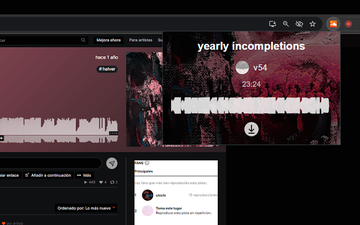
Some browser add-ons can also bring you a more convenient process to download SoundCloud in WAV, and SoundCloud Track Downloader is one of them that can help. Only by installing the extension to your Chrome browser, a default download button can be added to each SoundCloud track. Tap it and the extension will analyze the source to deliver downloading options right away. Simply follow the easy steps to get it done with ease:
STEP 1. Install the SoundCloud Track Downloader to your Chrome first. Once complete, the download button will be inserted to every SoundCloud track when it is activated.
STEP 2. Go to SoundCloud and open a track you’d like to download in WAV format. The download icon will appear on the cover art.
STEP 3. Tap the download icon and the downloading options will be provided. Choose the WAV format and tap “Download” to save the SoundCloud song as a local WAV audio file offline.
Top 4. Scdl GitHub-Based Tool
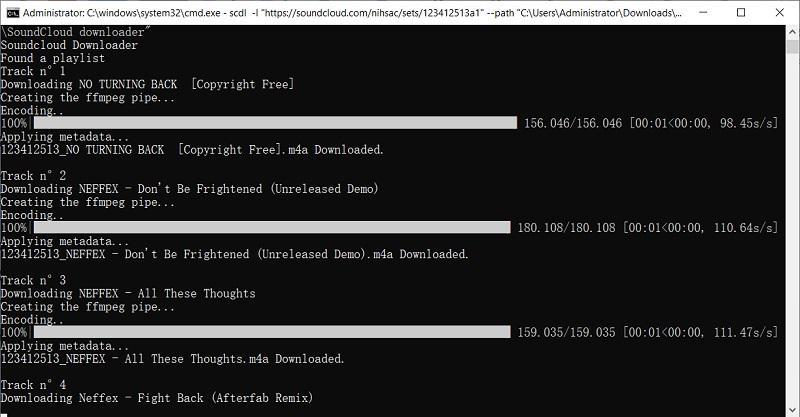
If you want some lightweight and open-source SoundCloud to WAV downloading tools, GitHub also offers some options developed by individual developers. Scdl is a public source that provides speedy performance to download SoundCloud to WAV files. It also supports playlist download, which can analyze and grasp songs from a list, like a playlist, favorites, or even a user, artist, etc. However, the installation of the tool will be a bit complicated. To use Scdl to save SoundCloud tracks in WAV format, follow the steps below and try:
STEP 1. Firstly, install Python 3, and then also install ffmpeg to add it to your PATH.
STEP 2. Use pipx and run the commands in Python 3 to complete Scdl’s installation:
brew install ffmpeg pipx
pipx install scdl
Once complete, check the file location by going to the following paths on different systems:
- Windows: C:\Users\username\.config\scdl\scdl.cfg
- Mac/Linux: ~/.config/scdl/scdl.cfg
STEP 3. If you make sure the configuration file is installed, use the following commands to download SoundCloud to WAV right away, and the files will be outputted on your desktop in WAV format:
- Download track & repost of the user QUANTA: scdl -l https://soundcloud.com/quanta-uk -a
- Download likes of the user Blastoyz: scdl -l https://soundcloud.com/kobiblastoyz -f
- Download one track: scdl -l https://soundcloud.com/jumpstreetpsy/low-extender
- Download one playlist: scdl -l https://soundcloud.com/pandadub/sets/the-lost-ship
Top 5. Audacity Audio Recorder
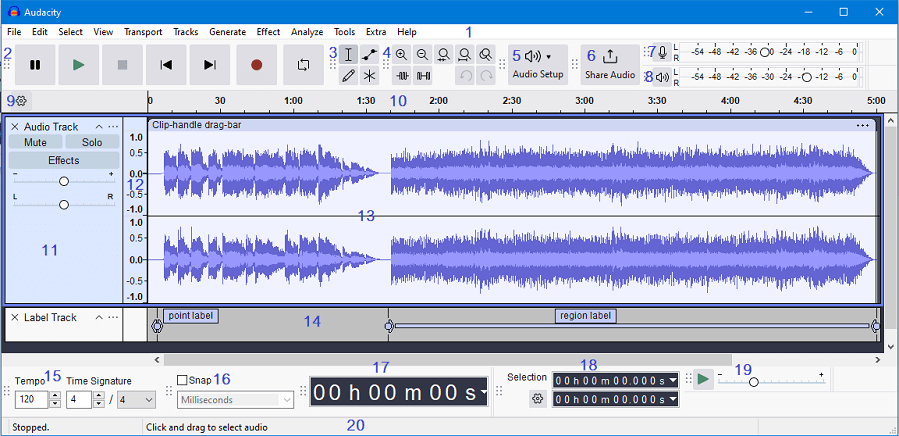
Last but not least, using a recorder is also a reliable method to capture SoundCloud playback in real-time, and then export recordings in WAV format. Free audio recorders like Audacity can help you complete the task freely and without complicated operations. Here are the detailed steps on recording SoundCloud to WAV via Audacity on your desktop:
STEP 1. After installing Audacity on the desktop, open it and set an audio output (like the internal speakers).
STEP 2. Then, directly open the SoundCloud track and start playing it. At the same time, tap the record icon on the toolbar of Audacity to start recording the audio.
STEP 3. Once complete, stop the recording and select “File” > “Export” to select WAV format to save the recording locally.
FAQs About SoundCloud to WAV Conversion
Q1. Is downloading SoundCloud to WAV legal?
A: It depends on the copyright status of the track. Some of the SoundCloud songs are actually copyright-free and you can download even use them for commercial purposes. But still, you’d better ensure you have permission from the creator before downloading.
Q2. Can I convert SoundCloud playlists to WAV?
A: Yes, professional tools like MuConvert SoundCloud Music Converter support full playlist downloads. It embeds the official SoundCloud web player to let you select any SoundCloud playlist to download all songs at once without hassle in quite a time-saving way!
Q3. Will converting MP3 to WAV improve quality?
A: Not at all. If the original SoundCloud music source is MP3, re-encoding it by converting SoundCloud into WAV format won’t restore lost audio data.
Conclusion
It is not a difficult task to convert SoundCloud to WAV, after getting the 5 handy tools from this blog. Among all of them, MuConvert SoundCloud Music Converter stands out as the best SoundCloud to WAV converter with its high efficiency, lossless output quality, and stable as well as secure performance. Now, freely install the software and you can get its free trial to try downloading your favorite SoundCloud songs in WAV format just in one shot!
100% Secure 100% SecureGet Your Favorite Streaming Music in Lossless MP3 Format
Feel free to use MuConvert to batch-download music from 6 music streaming platforms. Save vast music collections in a minute!
More Posts
How to Download SoundCloud to MP3 [2026 Best Choices] Read More » 3 Ways to Download SoundCloud to M4A (Full Guide) Read More » 5 Best Free SoundCloud Playlist Downloaders of 2026 Read More » 5 Best SoundCloud to WAV Downloaders in 2025 Read More » Top 4 Ways to Download SoundCloud to FLAC (2025 Updated) Read More »