

SoundCloud offers fresh tracks, underground mixes, and curated playlists. However, downloading these tracks for offline listening, especially on a mobile device, requires a subscription. That’s where a reliable SoundCloud playlist downloader comes in handy. They make playlist saving effortless. How can you find a proper one among so many options out there, even many of them doesn’t support processing SoundCloud playlist download at all? This guide helps. It highlights the top 5 SoundCloud playlist downloaders in 2026. Without testing each, you can quickly find the best fit!

1. Best SoundCloud Playlist Downloader for Desktop: MuConvert SoundCloud Music Converter
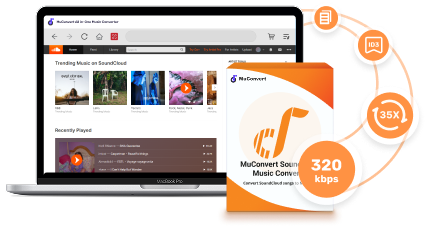
Desktop software is known for stability and excellent overall performance. That’s the reason MuConvert SoundCloud Music Converter ranks top. As a desktop software, it works seamlessly on Windows computers and Macs. It not only ensures a 100% safe experience but also offers a high conversion rate. You will hardly experience failures when using it for conversion.
 100% Secure 100% Secure
MuConvert enables you to download any SoundCloud content without a Premium subscription. It has a built-in web player. You can save your favorite tracks, audiobooks, podcasts, etc., for offline listening, even with a free SoundCloud account. It supports drag-and-drop downloading. You can search and add the desired tracks to the queue without switching between pages for URL copying & pasting. Taking the SoundCloud to MP3 conversion as an example, let’s explore how it streamlines the whole process.
How to Download SoundCloud Playlists via MuConvert
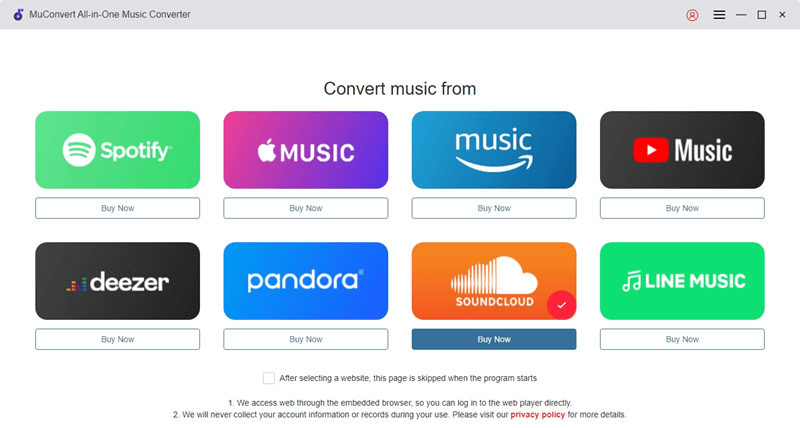
Step 1. Access the Web Player
Download, install, and launch MuConvert SoundCloud Music Converter on your computer. Select SoundCloud.
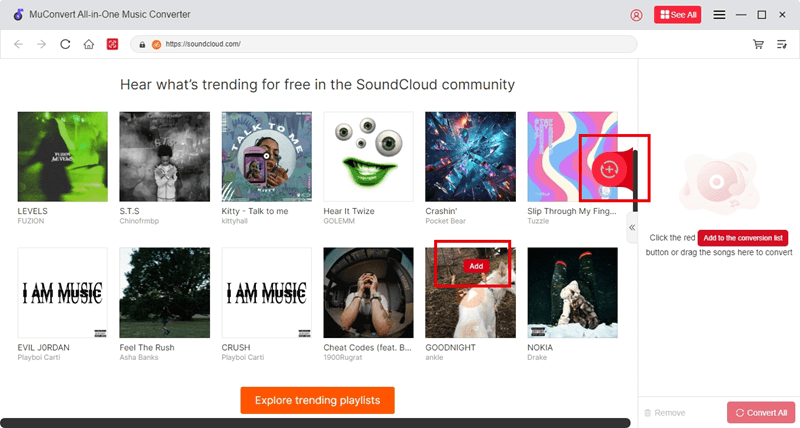
Step 2. Add SoundCloud Playlist to Download
Find the SoundCloud playlist you want to download, drag and drop it to the big red floating “+” button, and MuConvert will add it to the queue for parsing. There are no limits on how many tracks you can add.
Step 3. Set Ouput Parameters
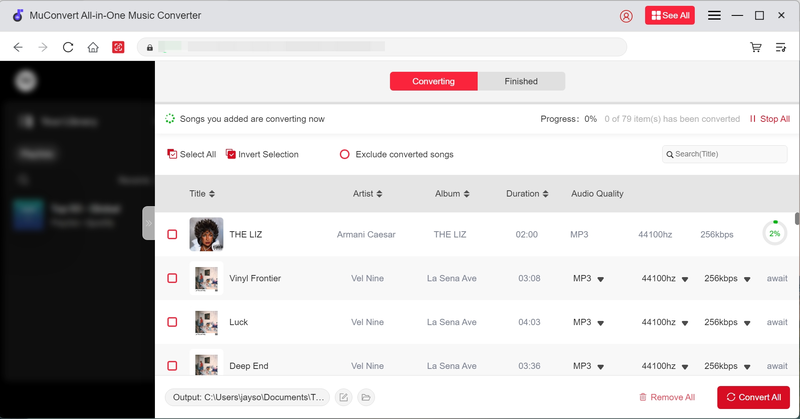
You can find all the parsed SoundCloud tracks under the “Converting” column. Here, you can preview track details and set the preferred format and quality. Take the format setting as an example, you can either set the format for each song or all added tracks by confirming “Apply to All”.
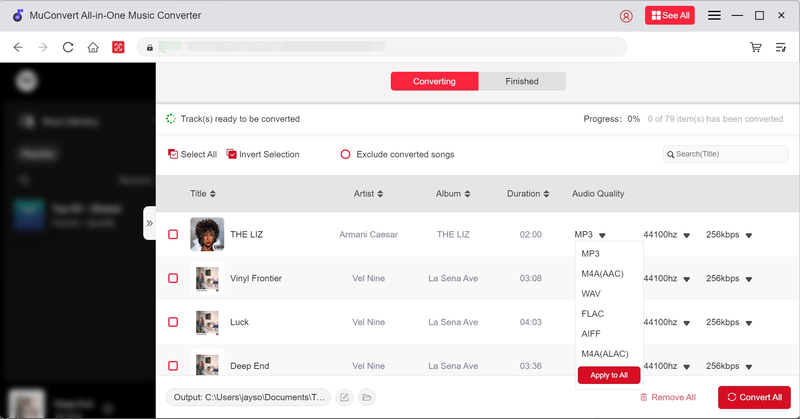
Step 4. Download SoundCloud Playlists
After confirming your settings, click “Convert All”, and MuConvert will start downloading SoundCloud playlists for you. Each song will be an individual one; you don’t need to unzip for listening.
Hands-on Testing Experience
To evaluate if MuConvert SoundCloud Music Converter as it claims, we tested it as a desktop SoundCloud playlist downloader under typical user conditions, focusing on stability, speed, audio quality, and overall usability.
✅ Test Setup
Device: Windows 11 PC & macOS
SoundCloud account: Free (no Go / Go+)
Test content:
- 1 SoundCloud playlist (50+ tracks)
- 5 single tracks (mixed lengths, including long podcasts)
Output format: MP3 (320kbps), FLAC (lossless)
✅ Test Results
Speed and Reliability: The built-in web player can load smoothly for playlist selection, and all songs could be added via search or drag-and-drop without copying URLs. While adding playlists to the conversion window, the resolving speed was fast, and batch downloads ran stably at high speed, even with large playlists. Across multiple test runs, there were no random failures, forced refreshes, or interruptions.
Audio Quality: MP3 files exported at 320kbps retained clear vocals, balanced mids, and strong detail, while FLAC files matched the original streaming quality closely. No noticeable compression artifacts or volume inconsistencies were found between tracks.
Safety & User Experience: Throughout testing, MuConvert SoundCloud Music Converter remained fully ad-free with no pop-ups, redirects, or bundled installers. The software triggered no antivirus warnings and ran smoothly in the background during long batch conversions. The interface was clean and intuitive, even for first-time users.
✅ Final Verdict
MuConvert SoundCloud Music Converter guarantees high efficiency and can maintain a smooth as well as stable performance to process SoundCloud playlist download. Its built-in web player is a highlight for bringing higher convenience. The whole process is stable with merely no failures or errors occured, ensuring high conversion success rate.
Overall, MuConvert SoundCloud Music Converter is a reliable desktop downloader. It is more than a regular SoundCloud to MP3 playlist downloader. You can also use it to download SoundCloud to FLAC and other formats. If you weigh stability and ease of downloading, it is the best choice. Below are in-depth breakdowns of its pros and cons for a quicker decision.
Pros and Cons
Pros
- Download SoundCloud playlists without account logging
- Download SoundCloud playlists/songs/albums in bulk at 35X faster speed
- Output music in MP3, FLAC, M4A, WAV, etc. for cross-device offline playing
- Keep the original sound quality for immersive offline listening and various personal use occasions
- Preserve ID3 tags for better organization on different devices
- Work on Windows and Mac, with no steep learning curve when switching between them
Cons
- A paid tool that is limited to converting the first 3 minutes of each SoundCloud song during its free trials.
2. Best SoundCloud Playlist Downloader to ZIP: SoundCloudAud
Downloading batches of songs at once can be troublesome cause it will take time for you to manage tons of songs at once. Therefore, some online tools will help you download SoundCloud playlists to a ZIP file for easier storing and transferring. SoundCloudAud supports SoundCloud playlists download that can help you pack up all songs in one single album or playlist to a ZIP file in MP3 format. It doesn’t require extra software installation, and only with a web browser, you can process the conversion and download SoundCloud playlists in MP3 instantly.
Here’s the how-to guide
Step 1. Go to SoundCloud, navigate to the playlist you want to download, and copy its URL from the address bar.
Step 2. Paste it into the search bar on SoundCloudAud and wait for the service to parse the playlist.
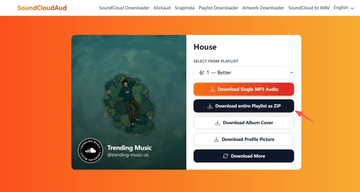
Step 3. Select “Download entire Playlist as ZIP” and SoundCloudAud will bundle all tracks in the playlist into a single file.
Hands-on Testing Experience
Here use Chrome browser to test SoundCloudAud for its reliability and music output conditions.
✅ Test Setup
Device: Desktop (Windows 11, Chrome browser)
SoundCloud account: Free
Test content:
- 1 SoundCloud playlist (20+ tracks)
- 1 album (10 tracks)
Output format: MP3 (default), packaged as ZIP
✅ Test Results
The playlist link phrasing time of a 20-track playlist averaged around 30–60 seconds, after which tracks were prepared for download. The ZIP file was generated correctly, bundling all MP3 files into one compressed folder, which made downloading and storage more convenient than saving songs one by one. However, occasional delays occurred during peak hours, and one test required a page reload before the ZIP link appeared.
Pros and Cons
Pros
- Compress all tracks in SoundCloud playlists into one file for easy storage and transfer
- Support downloading SoundCloud playlists to single MP3 tracks
- Save the album cover and profile picture separately
- Keep track metadata intact for better management
- Browser-based service, no software installation is required
Cons
- Require unzipping the entire playlist for listening
- Limited to MP3 files for the audio output
- No customized option for audio quality
3. Best Free SoundCloud Playlist Downloader Online: SCloudPlaylistDownloader.com
For those who want a SoundCloud playlist downloader for free, SCloudPlaylistDownloader.com could be a good destination. It is compatible with popular browsers like Google Chrome, Mozilla Firefox, Safari, Opera, and all Chromium-based browsers. You’ll have a seamless experience when downloading SoundCloud playlists as MP3s. Even for content in MA4, which is for SoundCloud premium subscribers, it can be grabbed as separate songs or a single ZIP file. However, it doesn’t support M4A output. You still need the MuConvert SoundCloud Music Converter to download SoundCloud to M4A files.
Step 1. Go to SoundCloud, navigate to the playlist you want to download, and copy its URL from the address bar.
Step 2. Paste it into the search bar on SCloudPlaylistDownloader.com.
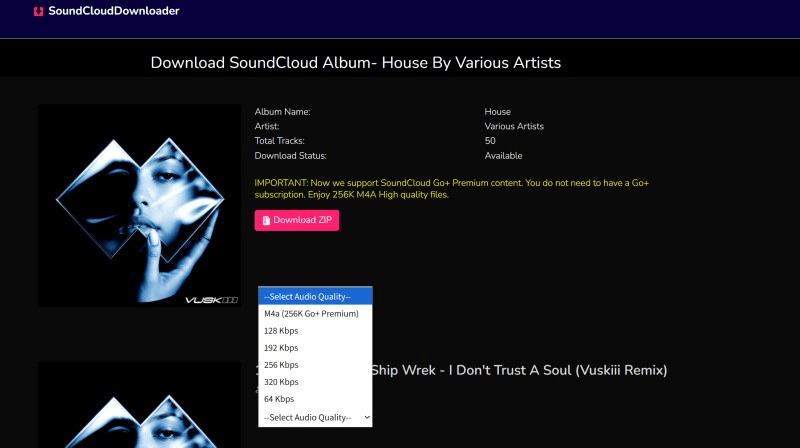
Step 3. A new page will show with download options. Select “Download ZIP”, and you will get one zipped file. Click “Generate Download Links” for each song, you’ll be offered audio quality options, select the desired one, and the downloading process will begin immediately.

Hands-on Testing Experience
To test this free online SloudCloud playlist downloader, we mainly focused on browser compatibility, playlist handling, output options, and overall reliability.
✅ Test Setup
Device: Desktop (Windows 11 & macOS)
Browsers tested: Chrome, Firefox, Safari
SoundCloud account: Free
Test content:
- 1 SoundCloud playlist (25 tracks)
- 1 premium-only track (M4A source on SoundCloud)
Output format: MP3 (single files & ZIP package)
✅ Test Results
In testing, SCloudPlaylistDownloader.com successfully detected playlist links across all major browsers (we tested Chrome, Firefox, and Safari on both Windows and Mac computers). Playlist parsing took around 40–70 seconds for 25 tracks, after which users could choose between downloading individual MP3 files or a single ZIP archive. Most downloads completed without errors, though two tracks failed to process on the first attempt and required reloading the page. As for the audio quality, it will contain some noticeable quality reduction compared to the original stream. So for users seeking high-bitrate or lossless audio, it can be less satisfied.
Pros and Cons
Pros
- Support downloading singles in playlists and an entire playlist in a single ZIP
- Claim to download SoundCloud Go+ Premium content in 256K M4A audio
- No installation required
- Support various audio quality
Cons
- There’s a 100-song limit per playlist download
- The ZIP download feature may not be free in the future
- No batch downloading when downloading separate tracks in a playlist
4. Best SoundCloud Playlist Downloader Browser Plugin: Addoncrop
Browser plugins are another installation-free solution to download SoundCloud playlists. Among so many options, Addoncrop SoundCloud Music Downloader stands out for its great compatibility. Besides Chrome, Opera, and Edge, it also supports Yandex, Brave, and Vivaldi. This covers almost all mainstream browsers. Another unique feature is the built-in cutter. You can trim downloads to size without using extra tools. Taking Chrome as an example, below is the guidance on how to use this SoundCloud full playlist downloader.
Step 1. Go to the Addoncrop homepage, click “Add To Chrome”, and you’ll be navigated to install the extension. Confirm “Add extension > Allow Permissions > Allow”, and wait for it to install on your Chrome. Please note that it will install the “CrossPilot” extension first and then ask for permission for Addoncrop.
Step 2. Once it is installed, you will see a download icon when browsing SoundCloud playlists
Step 3. Open the SoundCloud playlist you want to download, then directly click the “Download” button, and all songs will be downloaded to MP3 files immediately.
Hands-on Testing Experience
As a browser-based SoundCloud playlist downloader, brower compatibility and stability can be important points during our testing.
✅ Test Setup
Device: Desktop (Windows 11)
Browsers tested: Chrome, Edge, Brave
SoundCloud account: Free
Test content:
- 1 SoundCloud playlist (18 tracks)
- 3 single tracks
Output format: MP3
✅ Test Results
After installing the Addoncrop extension, download buttons appeared directly on the SoundCloud track and playlist pages. In testing, single-track downloads started almost instantly, while playlist downloads processed tracks one by one. Most tracks were downloaded successfully, with clear audio effect that is enough for background playback, workouts, or commuting, though a few required reloading the SoundCloud page before the download button became responsive again.
Pros and Cons
Pros
- Save SoundCloud playlists to high-quality MP3, with bitrates up to 320 kbps
- Retain ID3 tags for easy management of all downloads, even on a different device
- Feature a Soundcloud cutter that lets you trim downloads to size
- Download tracks without a SoundCloud login
- Open to all users for free use
Cons
- Support the MP3 format only for the output audio
- Cannot choose bitrates for songs
- Require the separate Crosspilot extension to function
5. Best Open-Source SoundCloud Playlist Downloader: SoundCloudDownloader
For users who value transparency and security and want to inspect the code to ensure there are no malicious components, SoundCloudDownloader is an excellent open-source choice. Like many regular online SoundCloud playlist downloaders, this C#-based application also helps you download tracks, playlists, and albums from SoundCloud. All you need to do is copy & paste a URL.
Here is how SoundCloudDownloader working:
Step 1. Download and install the compatible version on your computer.
Step 2. Run the software, copy & paste the playlist URL into the search bar, and the tracks will be added to the queue.
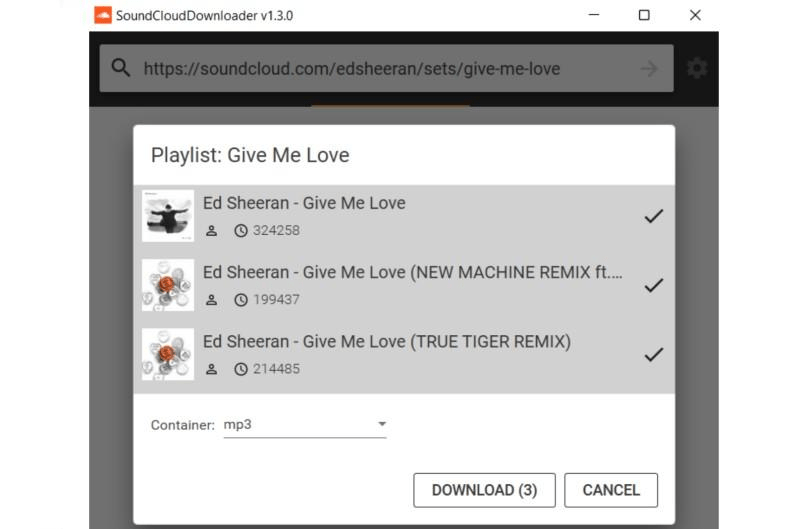
Step 3. After parsing, a pop-up window will show. Select the desired title, click “Download”, and the added tracks will be downloaded to MP3 files.
Hands-on Testing Experience
Based on Windows 11 PC, here tested SoundCloudDownloader from its stability and efficiency in downloading SoundCloud playlists.
✅ Test Setup
Device: Windows 11 PC
Build type: Open-source C# release (GitHub)
SoundCloud account: Free
Test content:
- 1 SoundCloud playlist (15 tracks)
- 4 single tracks
Output format: MP3
✅ Test Results
During testing, SoundCloudDownloader stood out for its transparency. The full source code was publicly available and could be reviewed before compilation, which is reassuring for users concerned about malware or hidden trackers. Setup required downloading the release package and launching the executable-no bundled installers or adware were detected.
Downloaded MP3 files maintained a consistent, standard audio quality suitable for everyday listening. While there were no advanced options for selecting bitrate or formats, the output was clean and free from noticeable distortion.
Pros and Cons
Pros
- The code is available for review, fostering trust for users
- Capable of downloading entire playlists from a URL
- Automatically add media tags to the downloaded files
- Skip repeated downloads in the output directory when downloading multiple files
- Free to use
Cons
- Program installation is required
- Limited to downloading up to 10 tracks at once
- The project is currently in maintenance mode, which could mean less frequent updates or bug fixes
Final Verdict
To give you a quick overview, here’s how the top 5 SoundCloud playlist downloaders in 2025 stack up against each other.
| Downloader | Type | Paid or Free | Batch Download | Output | Audio Quality | ID Tag Preservation | Best For |
|---|---|---|---|---|---|---|---|
| MuConvert SoundCloud Music Converter | Desktop Software | Paid | Yes | Separate files in MP3, FLAC, WAV, M4A, etc. | High | Yes | Heavy users & long-term reliability |
| SoundCloudAud | Online ZIP File Downloader | Free | No | Single or zipped MP3 tracks | General | Yes | Users wanting playlists in ZIP format |
| SCloudPlaylistDownloader.com | Online Tool | Free | No | Single or zipped MP3 tracks | High | Yes | Casual users needing free, quick downloads |
| Addoncrop | Browser Plugin | Free | No | Separate MP3 files | High | Yes | Quick browser-based downloads |
| SoundCloudDownloader (GitHub) | Open Source | Free | Yes (10 downloads at once) | Separate MP3 files | General | Yes | Tech-savvy users valuing open-source transparency |
If you’re looking for the best SoundCloud playlist downloader, MuConvert SoundCloud Music Converter is the clear winner. Unlike browser tools or free sites, it delivers consistent performance. You can save all content available in SoundCloud, including singles, audiobooks, podcasts, etc., for permanent backup. Besides MP3 files, you can also choose from WAV, FLAC, M4A, etc. Try it today to experience ultra-fast 35X faster downloading speed!
100% Secure 100% SecureGet Your Favorite Streaming Music in Lossless MP3 Format
Feel free to use MuConvert to batch-download music from 6 music streaming platforms. Save vast music collections in a minute!
More Posts
How to Download SoundCloud to MP3 [2026 Best Choices] Read More » 3 Ways to Download SoundCloud to M4A (Full Guide) Read More » 5 Best Free SoundCloud Playlist Downloaders of 2026 Read More » 5 Best SoundCloud to WAV Downloaders in 2025 Read More » Top 4 Ways to Download SoundCloud to FLAC (2025 Updated) Read More »