

When SoundCloud became the creative hub for musicians, DJs, podcasters, and other individual creators as well as music streaming lovers around the globe, there are millions of niche tracks available for discovery. Nevertheless, it sucks when you want to download SoundCloud to FLAC or even other formats for keeping lossless copies of your favorite tracks – most songs are not available for downloading, and those copyright-free resources can only be downloaded in compressed formats as the original uploaded files.
Therefore, to overcome this obstacle and let you save SoundCloud in lossless FLAC format successfully, this post has explored 4 effective ways to help. In the following, let’s break down the guide and grab the appropriate solution to download SoundCloud songs to FLAC in no time!

Way 1. Download SoundCloud Playlist to FLAC with Professional Downloader
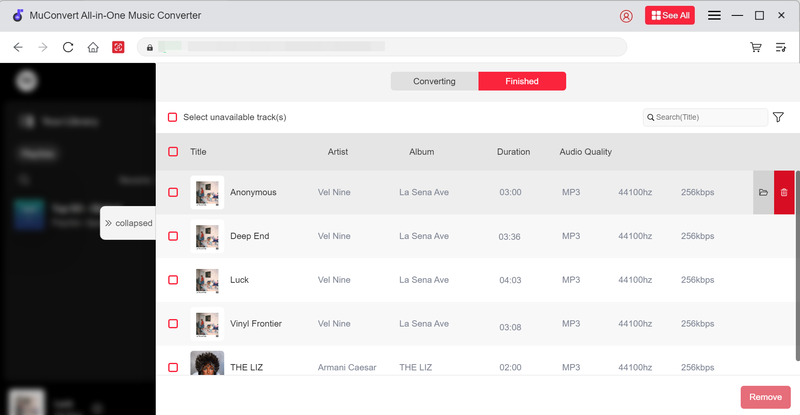
As we know, SoundCloud protects its uploaded music resources by adding the DRM technique to restrict usage. Therefore, the most recommended approach is to unlock the encryption and download SoundCloud to FLAC can be using a professional desktop program that can decode protected sources. Among the best options, MuConvert SoundCloud Music Converter has gained a good reputation and stands out from competitors for its stability, conversion speed, and ability to maintain original audio quality.
 100% Secure 100% Secure
Unlike traditional music converters, MuConvert SoundCloud Music Converter integrates a built-in SoundCloud player to give you full access to the music database, and browse all SoundCloud songs as well as platforms to queue them for bulk conversion. It delivers lossless FLAC format to export SoundCloud downloads without compression, retaining an original music streaming experience offline.
MuConvert SoundCloud Music Converter also guarantees a crash-free experience, with embedded hardware acceleration techniques adopted to facilitate the music download at higher efficiency. You can resolve multiple track lists download at 35X faster speed, saving much time even if you get dozens of songs to save offline at once.
- Direct SoundCloud login to download all SoundCloud songs with embedded web player.
- Exports tracks, playlists, and albums to directly save them offline in FLAC, MP3, and more formats.
- 100% lossless sound quality preserved (optimal settings cover a wide range to the highest 320Kbps).
- Fast bulk conversion speed at 35X faster with stable performance.
- Retain full ID3 tags for automatic music classification in one shot.
Now, please walk through the manipulation guide and grab the proper way to download SoundCloud music to FLAC with MuConvert SoundCloud Music Converter effortlessly:
Step 1. Log in to SoundCloud Player
First, run MuConvert SoundCloud Music Converter on desktop and select SoundCloud.
100% Secure 100% Secure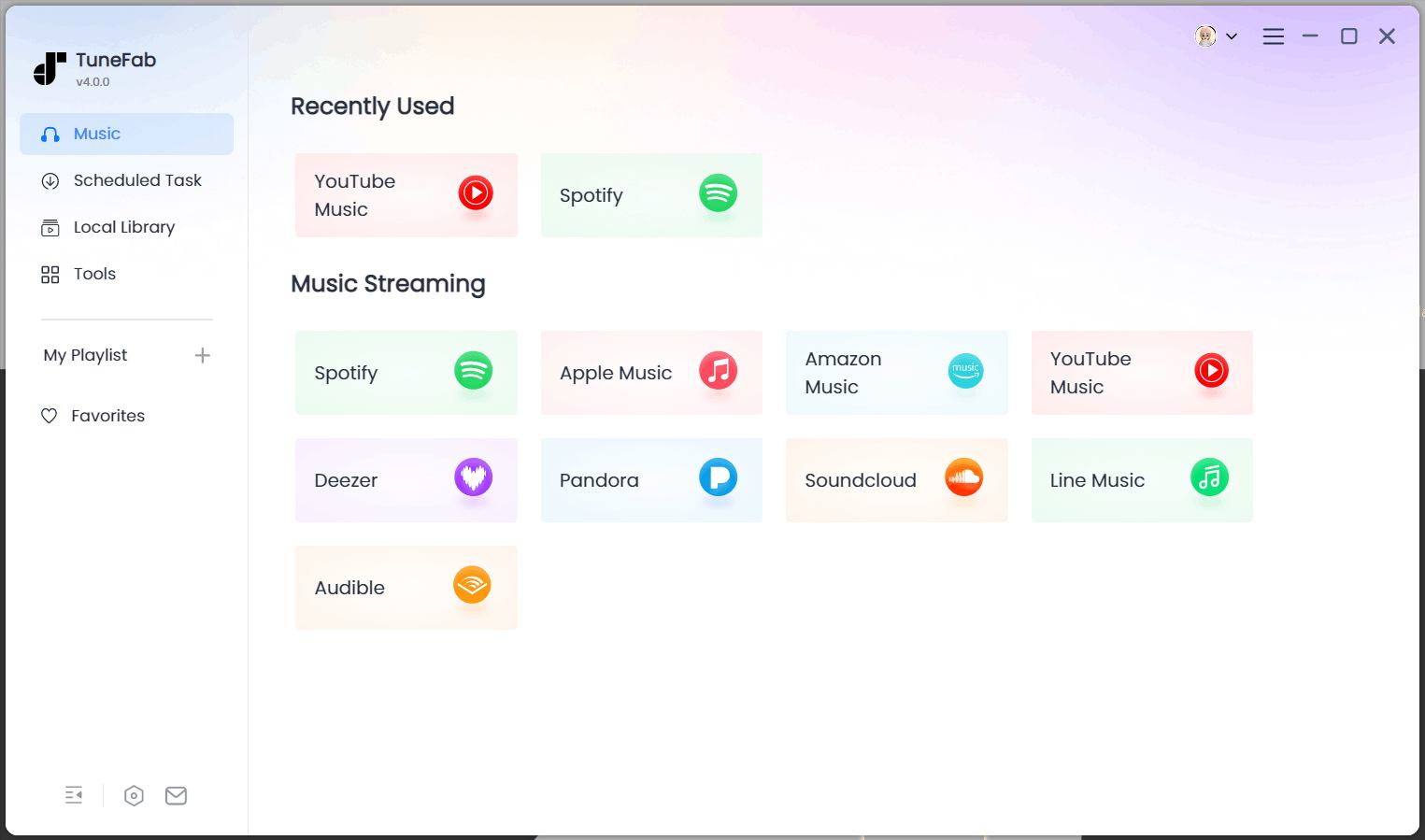
Step 2. Add SoundCloud Songs
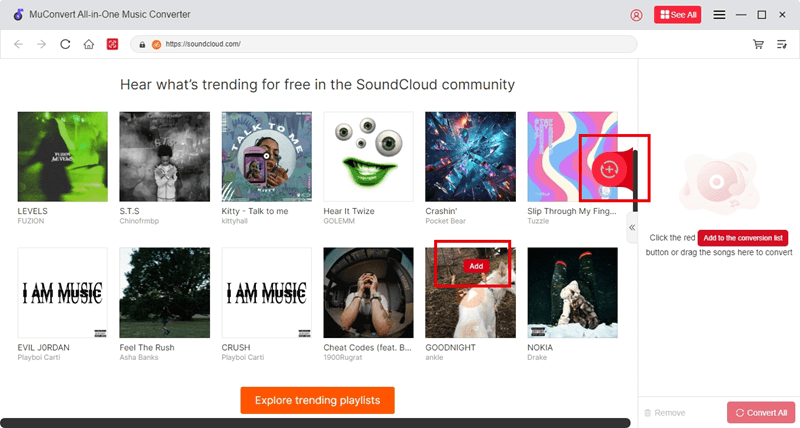
Once the login completes, you can browse the songs and playlists you like to prepare for the music download. Please tap the Add button on the cover of the playlist or directly drag the targeted list/song to the conversion panel on the right side.
Step 3. Configure Audio Parameters
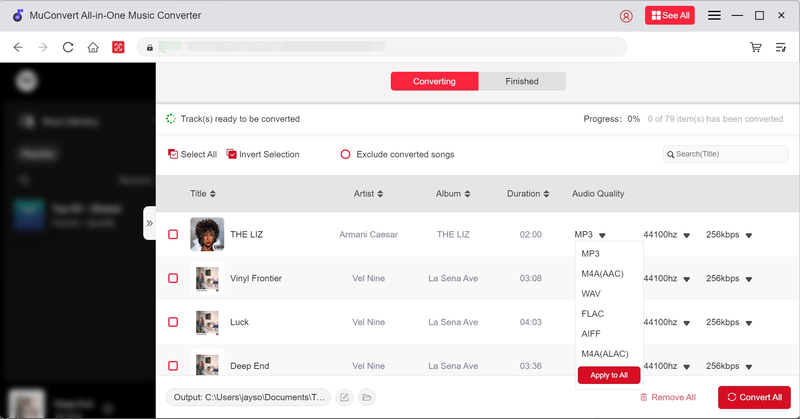
After adding songs, you can turn to the Converting window and further configure audio parameters before starting the music download. Please select FLAC as the format to export the downloads. In addition, both SampleRate and Bitrate can be adjusted here to determine the streaming quality.
Step 4. Download SoundCloud to FLAC
Eventually, when the settings are over, please tap the Convert All button to process the download in no time.
Way 2. Use Online Tool to Convert SoundCloud to FLAC Without Software Installation
If you only need to convert a handful of tracks and don’t want to install any third-party program, using an online tool is a much easier path. Soundcloudrips is a web-based service with a dedicated SoundCloud downloading service provided, delivering a FLAC option to let you save music in FLAC format with decent quality.
Although pop-up ads can be annoying while using the service, it is still excellent for one-off SoundCloud conversion, and can work across devices, including computers, smartphones, and tablets.
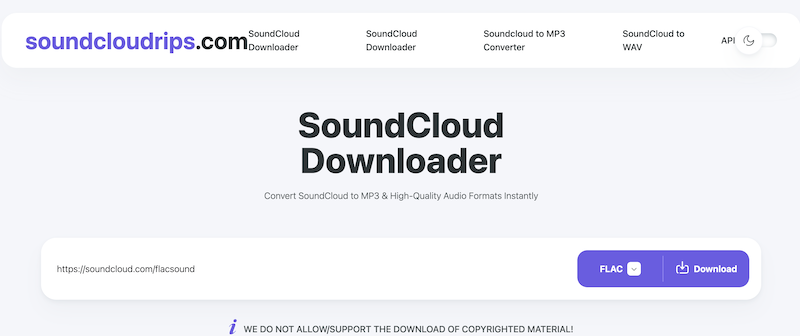
To resolve the online music download, now, also follow the procedures below to complete:
Step 1. Go to SoundCloud and discover the song you want to download. You need to tap its Share button and copy the link first.
Step 2. Turn to Soundcloudrips and directly paste the music link to the search bar. You can directly select FLAC from the provided format menu next to the search bar and tap Download to phrase the link.
Step 3. When the conversion is over, a Download button will be provided. Click on it and you can download the converted SoundCloud song in FLAC format instantly.
Way 3. Install Browser Extension to Directly Download SoundCloud to FLAC
Another quick and free option is to use browser-based extensions that add download buttons directly onto SoundCloud’s web player. SoundCloud Music Downloader is such an extension designed for Chrome, Edge, Opera, and other mainstream browsers. By installing it in browsers, a download button will be inserted to every SoundCloud track. Even for SoundCloud playlists, SoundCloud Music Downloader can resolve them at once to batch download songs for you!
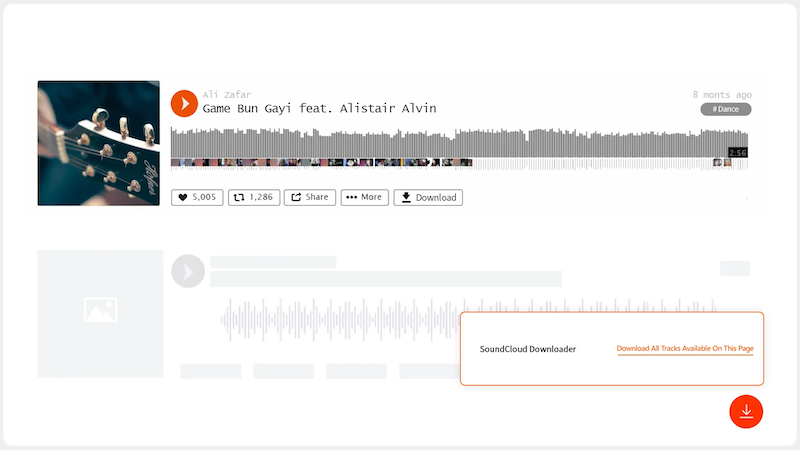
Now, let’s use the SoundCloud to FLAC converter in the browser instantly:
Step 1. On the product page of SoundCloud Music Downloader, tap Add to Chrome to install it first.
Step 2. Once the installation completes, directly go to SoundCloud and open a track or playlist you’d like to download.
Step 3. Tap the inserted orange download button, then the extension will detect the containing songs on the page and provide downloading options to you. Then you can directly download SoundCloud music to FLAC offline.
Way 4. Quick Download SoundCloud to FLAC with Easy GitHub Tool
Last but not least, the open-source GitHub tool, SoundCloudDownloader developed by jerry08 also offers a quick way to download SoundCloud to FLAC format. It resolves the music download by the simple URL copy-and-paste method. As the tool is lightweight enough, it can run smoothly and quickly to resolve music conversion to let you instantly download the converted FLAC files with one shot!

Let’s also walk through the guide to manipulate the SoundCloud to FLAC conversion in no time:
Step 1. First, directly install SoundCloudDownloader on your desktop (it is only compatible with Windows systems currently).
Step 2. Prepare the SoundCloud music link and paste it to the downloading bar in SoundCloudDownloader. Playlist URL is also supported.
Step 3. When the songs are grabbed, a pop-up window will appear to let you select the output format. Choose FLAC and tap Download. All of them will be saved in a zip file locally.
FAQs
Does SoundCloud support FLAC uploads?
Yes. According to SoundCloud’s official documentation, you can upload files in formats including FLAC, WAV, AIFF, ALAC, MP3, and more. This makes it convenient for artists who want to share their music artwork at lossless quality.
Is FLAC better than MP3 for SoundCloud tracks?
Absolutely. FLAC can preserve the original studio quality, while MP3 uses lossy compression. If storage space isn’t a concern, FLAC is the superior choice as it will take up much storage space.
Related Reading: Best SoundCloud to MP3 Converter Tools in 2025 [Top 8 Picks]
Is it legal to download SoundCloud to FLAC?
It depends. Many artists enable free downloads, but not all content is licensed for redistribution. Always respect copyright and only download for personal use unless permission is granted. Otherwise, you will be easily infringed of breaking copyright regulations.
Final Verdict
To download SoundCloud to FLAC, you can try the 4 methods. Despite the free options like the online or GitHub tools, for quality-guaranteed and efficient music download, MuConvert SoundCloud Music Converter can no doubt be a superior option. Now, freely get it installed and start saving your favorite SoundCloud tracks in FLAC losslessly!
100% Secure 100% SecureGet Your Favorite Streaming Music in Lossless MP3 Format
Feel free to use MuConvert to batch-download music from 6 music streaming platforms. Save vast music collections in a minute!
More Posts
How to Download SoundCloud to MP3 [2026 Best Choices] Read More » 3 Ways to Download SoundCloud to M4A (Full Guide) Read More » 5 Best Free SoundCloud Playlist Downloaders of 2026 Read More » 5 Best SoundCloud to WAV Downloaders in 2025 Read More » Top 4 Ways to Download SoundCloud to FLAC (2025 Updated) Read More »